Saturday, March 2, 2019

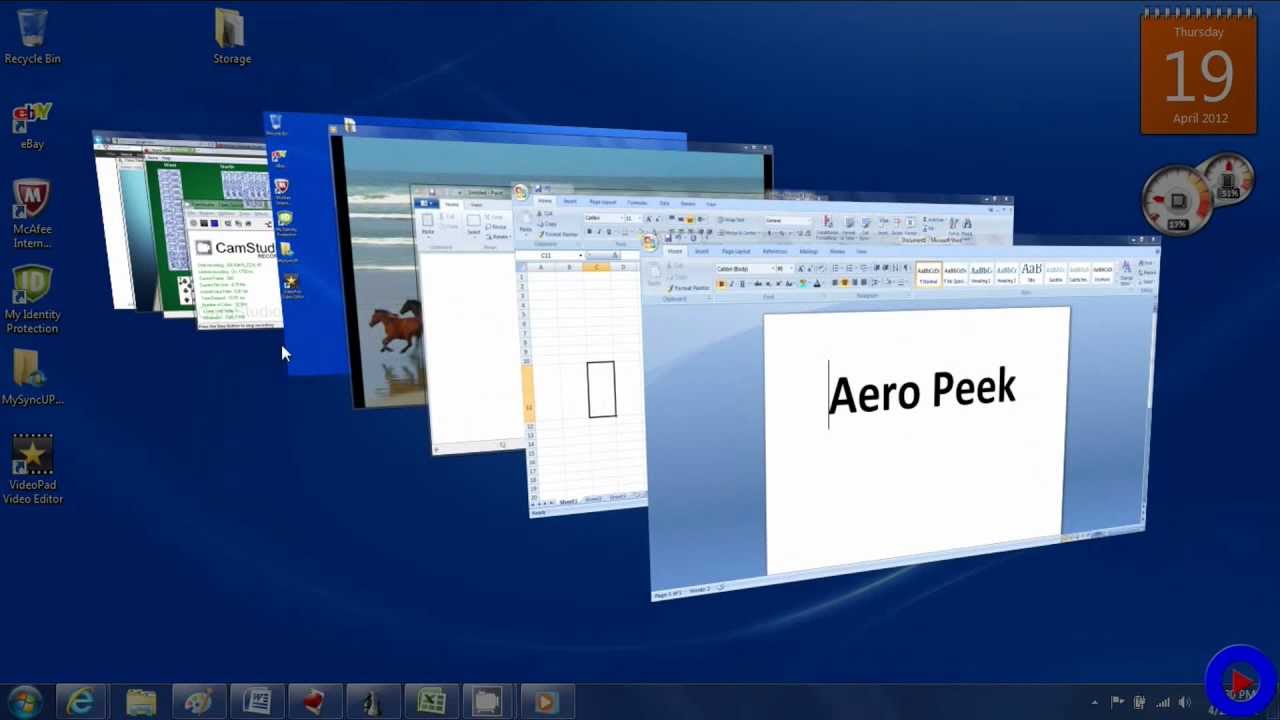
Keyboard shortcuts !! Aero Peek !!

Aero Shortcuts 


[Windows] + [Spacebar] (Aero Peek) 
Make all open windows transparent to view gadgets and icons on desktop. cool keyboard tricks 
[Windows] + [D] (Aero Peek) 
Show or hide the desktop. 
 [Windows] + [Home] (Aero Shake) 
Minimize all but selected window. Reverse by clicking the key combination again. 
 [Windows] + left arrow OR [Windows] + right arrow (Aero Snap) 
Dock selected window to the left or right half of your screen. 
 [Windows] + up arrow OR [Windows] + down arrow (Aero Snap) 
Maximized and restores the selected window. 
 [Windows] + [SHIFT] + up arrow OR [Windows] + [SHIFT] + down arrow (Aero Snap) 
Maximizes and restores selected window in vertical dimension only. 
 

 [Windows] + [Tab] (Aero Flip) 
Launch 3D representation of open windows and click [Tab] key again to flip through them. 
 [Alt] + [Ctrl] + [Tab] + left/right/up/down arrow 
Flip window. 
 [Alt] + [Tab] 
Cycle through open windows.

Important Short Keys ! ! !


Keyboard Short Keys


If you feel that your mouse is not working properly, than you can use these short keys to operate without mouse. Here are some common short keys. 
 Alt + Space + R
 This short key reduces the size of window 
 Alt + Space + M 
You can move any small size window to any corner of your desktop.Use arrows keys to move left, right, top or bottom and press Enter. 
 Alt + Space + X 
You can maximize any small window by pressing this short key. 
 Alt+space+N 
To minimize any window use this short key. 
 Alt + Tab
Maximize any minimized window. Moreover if you are using two or more than two programs then you can also use this short key to select your required programe.
 Win+U+U 
If you want to shut down your computer without mouse then press window key and then press “U” key 2 times. 
 Win + U + R 
Use these keys to restart your Computer. 
 YOU CAN CHANGE THE NAME OF ANY FOLDER WITHOUT MOUSE. Simply highlight required folder through arrows key and press “F2”. Write the name of folder and press Enter.

Friday, March 1, 2019

Why Flutter? I new Cross-Platform Framework made by Google !


Why Flutter?


Recently in the news as a revolutionary new mobile platform, Flutter has built up a lot of hype inside the mobile app developer community and outside it as well. What is the hype about? After the First official release, how much promise is the platform showing? Should mobile developers switch to Flutter? Let’s take a look.

So .. What is Flutter?

First off, let’s take a look at the official description of the platform from flutter.io:
"Flutter is Google’s mobile app SDK for crafting high-quality native interfaces on iOS and Android in record time. Flutter works with existing code, is used by developers and organizations around the world, and is free and open source."

Here are the important parts from that statement:

  1. “high-quality native interfaces” : Flutter contains elements from both Android and iOS, but unlike React Native, all elements, or “widgets”, are usable on both platforms. An app can now look exactly the same on both platforms instead of adopting platform specific looks.
  2.  “iOS and Android in record time” : The same codebase is usable for both Android and iOS apps reducing the need for separate development for Android and iOS. “But couldn’t we do the same in React Native?” Yes, but because RN pulls interface elements from the device, a lot of elements were platform specfic, rendering a single codebase to be larger than it needs it be.


What if I only want an Android app?

Flutter isn’t only focused on bridging the Android-iOS gap, it’s focused more on being a better way of building a mobile app. Native android development has some inherent issues, a lot of which developers don’t have many workarounds for. Here are a few key points for Android developement in Flutter:

No large repetitive Gradle build times.

Although gradle is a useful tool, the gradle build times for apps are rather large and is a hindrance for fast development cycles. This is not to say Flutter apps do not need a Gradle build at all, but they don’t need it multiple times. A flutter build invokes a Gradle build the first time it runs but does not need it again for a full restart of the app. Android Studio has reduced Gradle build times over time and features like Instant Run certainly are helpful but Flutter load times beat native times by leaps and bounds. Flutter’s hot reload is immensely helpful in smaller changes.

A single language for layout and backend.

Because Android has separate layout and Java/Kotlin files, we need to get references for views and then alter them in the backend files. Flutter uses a single language(Dart) for design as well as backend and uses a reactive framework, so we don’t need references to widgets(Flutter equivalent of views) at all.

Dart: making the obvious things easy.

Java has been showing it’s age for a while now and even after Java 8, it leaves a lot to be desired. Dart on the other hand borrows a lot of the most popular features of other languages without losing the familiarity of Java or similar languages. Dart was developed with common developer tasks in mind, making common things effortless

What about Fuchsia?


Fuchsia is acapability-based operating system currently being developed by Google. It first became known to the public when the project appeared on GitHub in August 2016 without any official announcement. In contrast to prior Google-developed operating systems such as Chrome Os and Android, which are based on Linux kernels, Fuchsia is based on a new microkernel called "Zircon".


This OS is written in “ C , C++ , Dart , Go , Python , Rust , Shell , Swift “ and as you read the system is written in Dart , So according to rumors Flutter is preface to develop apps for Fuchsia also , in other words Flutter not just for developing Android & IOS Apps in the same time , it’s for Fuchsia also 


Key take-aways:

  1. Flutter speeds up development by quite a bit.
  2. Easy-to-learn development language for existing mobile developers.
  3. Fluid animations and beautiful UI.
  4. Allows Android + iOS apps from the same codebase.

Drawbacks?

No platform is perfect and sometimes the lack of a particular feature can be a dealbreaker. Here are ones I personally think should be considered before you think of switching:
  1. Lack of packages: There are not as many packages written for Dart meaning you might have to write code for something you would usually do with a simple library or package. This is not a minor issue and should be treated with caution.
  2. No layout editor: Unlike in XML, there is no drag-and-drop interface available which could be a deal-breaker to some. Flutter does provide Flutter Outline to visualise the component tree better but it’s not as useful as actually looking at a generated screen.
  3. Limited StackOverFlow support: Because Flutter is new, support isn’t as extensive as normal Android, but the Flutter team is quite active on StackOverFlow, so all hope isn’t lost.


Conclusion

I tried working with Flutter mostly for the shared codebase between platforms and the UI elements and animations, and I recommend every mobile developer to give it a spin. It’s a fresh new way to see mobile app development.

A helpful hints :

  1. If you’re new to mobile app development, I’d recommend you to try native app development before jumping onto Flutter because for a novice, it has a sharper learning curve.
  2. Do a feasibility check for a production-level app because the packages you need may not be available.

Happy Coding!

PUBG uses machine learning to look for cheaters

An update from the anti-cheat team reveals how the developer tackles cheats.


Hitman 2's first mission is now free for everyone !!!


Take a trip to the scenic shores of New Zealand, and then murder someone, in the Hitman 2 Starter Pack.


Phil declared in his review of Hitman 2 that it "feels safe": It doesn't depart from the formula established by the first game, but it delivers levels "that can rival some of the best in Hitman's long history." The first of them, Hawke's Bay, is set in a small beachfront property in New Zealand, and as of today it's free for everyone in a new Hitman 2 Starter Pack on Steam. 

The Starter Pack provides full access to all Hawke's Bay content, including challenges and unlocks, hidden stashes, new starting locations and weapons, and escalating difficulties. From March 8-17 it will also be the location of the fourth Hitman 2 Elusive Target, Dame Barbara Elizabeth Keating, aka "The Politician," a former Minister of Trade and Foreign Affairs for New Zealand who was busted siphoning charity funds into her offshore account.   
She was ultimately able to pin the blame on the charity's director and now she's working to restore her reputation and position—and thus it falls to Agent 47 to deliver a modicum of justice by, umm, airing her out. Owners of the Starter Pack will have the same opportunity to do the job as everyone else, under the same set of rules: You get one shot, and if you blow it, she gets away for good. (Or at least until Io Interactive brings her back around again.) 

Thursday, February 28, 2019

Turning your keyboard into a mouse


If your mouse is not working and you don't wish to wait till you get a new one, you would definitely like to know how you can use your keyboard to control the mouse pointer. It is easy to use your mouse to input text using the On Screen Keyboard utility, but it is also possible to do the reverse. This article explains how.
1) Open Ease of Access Center by clicking the Start button , going to Control Panel, clicking Ease of Access, and then clicking Ease of Access Center.
2) Click Make the mouse easier to use.
3) Under Control the mouse with the keyboard, tick the Turn on Mouse Keys check box.

GeForce GTX 1660 and 1650 rumored to arrive in March and April starting at $179


More midrange Turing cards could be on the horizon ..


Now that Nvidia has popped the cork on a cheaper version of Turing that lacks RT and Tensor cores, the question is, will the company bolster its non-RTX lineup with more models? We don't have a definitive answer, but rumors of two new parts—GeForce GTX 1660 and 1650—are starting to pour in.
We've seen these models show up in leaks before, though now that the GeForce GTX 1660 Ti is official (and is one of the best graphics cards on a sub-$300 budget), there is a bit more credibility to the rumors. Just as we saw marketing materials for the GTX 1660 Ti pop up before its release, Andreas Schilling from Hardwareluxx has posted what he claims is the first batch of marketing images for the GTX 1660 and 1650.
Also  Digitimes has passed along some information it purportedly obtained from "industry sources." According to those sources, the GTX 1660 will launch on March 15 starting at $229, followed by the GTX 1650 launching on April 30 starting at $179.
Depending on how performance breaks down, those prices would put added pressure to AMD's Radeon RX 570, 580, and 590 cards, and of course there is still the GTX 1660 Ti and RTX 2060 to contend with at higher price points.
As it relates to graphics hardware, the midrange and low-end are where most gamers mingle. We see this represented in Steam's monthly hardware and software report. As of January 2019, the combined usage of RTX 2080 Ti, 2080, and 2070 is a fraction of a percent, whereas most gamers run a GTX 1060, followed by a GTX 1050 Ti and 1050.
We can only guess at the specs of the upcoming cards, assuming they exist. Schilling surmises the GTX 1660 will use a cut down version of the TU116 GPU found in the GTX 1660 Ti, also with 6GB of memory. The GTX 1650, meanwhile, could wield 4GB of slower and cheaper GDDR5 memory, on a narrower memory bus.
It's all speculation at this point, though we'd be surprised if the GTX 1660 Ti ended up being the only GTX Turing card when all is said and done.

It sure looks like Microsoft is testing Xbox One game support on Windows 10 PCs


Some interesting things are happening in Microsoft's Windows Insider program.


Turn your HOBBY into a JOB with INCOME (PART 2)


We are all looking for easy ways to make money (Part Two)

Hello again, today once again we will discuss money hobbies that are money 
making out there in the world.


1.   E-mail Support Agent

If you are interested in working as an e-mail support agent, you may want to check these websites every now and then to see if they are hiring. These are the companies that are continuously hiring e-mail/chat representatives.

·      Clara.interviewed

This is a work from home post, and one of your tasks, other than answering support tickets via e-mail, may include scheduling meetings for Clara, the site owner. Pay is currently undisclosed.


·      WayfairCareers.com

This site lists both office and home-based opportunities, mostly for customer support positions. Some jobs may require the agent to take phone calls, but the majority of their task involves answering support e-mails. Pay is currently undisclosed.


Focusing on e-commerce, this website is continuously looking for curious and hard-working leaders for their team. View job openings in the business, communications, and design fields, all of which includes answering e-mails and attending to customers needs. Pay depends on experience and job position.

2.   English Tutors

The demand for online English tutors is generally increasing. If you are looking for ways to make a living as an online teacher, here are some websites you can take a look at:

·       SayABC.com
Earn as much as 28$/hour as an ESL tutor for Chinese students.

·       MagicEars.com
The website of their teaching approach by matching the right teacher with the right student. Get paid between 22$-26$/hour.

·       Qkids.com
While this opportunity is only open to those residing in the United States and Canada, the workload is lighter as compared to the other two. The average rate is 20$/hour. You may work at your own pace.

3.   Researching

How about researching? Are you one of the people who whenever searches for something finds the right answer, accurate and in a time limit?
Then this is the right job for you, take a look at the companies and sites who are willing to pay you and become a talented researcher

·       FancyHands.com
This is an online platform that lists various researches tasks. Pay is currently undisclosed.

·       Ask.Wonder.com
Work with Wonder and be one of their personal research assistants. Answer customer questions, cite sources, and get paid per output. Pay depends on the task, but most research assistants get paid up to 2,000$ per month .

·       10EQS.com
This is another website that is looking for new researches. Topics may vary, and pay is currently undisclosed.

And we end it with this Three Online Jobs for this part. Hope we have at least helped you a little and made your way to finding your side income easy and there is a 3rd PART! Which will have different jobs than the ones we have mentioned so stick with us if we haven’t yet talked about your hobby 
And as always If you have any hobby and we haven’t mentioned it yet
 Please do share it below in the comments and thanks 


!!! PART 3 ( Soon ) !!!

Wednesday, February 20, 2019

Turn your HOBBY into a JOB with INCOME (PART 1)


We are all looking for easy ways to make money but it's never the easy task

but what if i tell you you have come to the right place to get to know all of the different online/part-time jobs that are out there waiting for you to just come and grab them

we will split them into categories so it's easier for you to find the jobs most suitable to you

Here are 10 Hobbies/Online jobs that may turn out to be your CALLING 


  1. Teaching/Tutoring

These are 3 online academic tutorial websites that pay you to work from home

  • PrepNow :    Pay varies depending on the number of sessions. pay starts at 15$/hour.

      2. Virtual Assistant


Get started as a virtual assistant with these 3 websites

  • VickyVirtual : Perfect for those who want to start their home-based career. No experience needed. Pay 9.25$/hour.
  • 247VirtualAssistant :  Online platform for general VA jobs, mostly part- time posts. The usual offer is $10 $12/hour.
  • VirtualAssistantVA :  Offers contract positions even without prior experience. Pays 9$/hour for actual output time on the job.

     3.  Transcriptionist :


3 Companies that will pay you from home to work as transcriptionist

  • TranscribeMe : Join the company and transcribe clips that are 1-2 minutes long. No application process, just fill out the form and you're ready to go. As soon as you have completed a task, you will be assigned another  clip. Earn $15-$22 per audio hour. 

  • Scribie.com : Go through a test rocess, get certified as a transcriber, isten to audio files, and type them out as accurately as possible. Pay is $5 per audio hour.

  • CrowdSurfWork : This company offers short transcription tasks. Pay starts at $6 per hour.

We all need a side income to get us through the month or it could be for savings, or debts...etc the reasons may differ but the goal is one! that's why we are here to build you a bridge that will allow you to reach your end line faster

This article will be divided to 3 or 4 parts 

We hope you will stick with us until the last one by then you would have at least found 3 side jobs that you would like to do and by then we would have finished our mission.


so until then, give the sites mentioned above a try and let us know below if they were a hit or miss.

!!! PART 2 ( Soon ) !!!


Thursday, January 3, 2019

What is CES !!

CES Is the Global Stage for Innovation 


CES is the world's gathering place for all those who thrive on the business of consumer technologies. It has served as the proving ground for innovators and breakthrough technologies for 50 years — the global stage where next-generation innovations are introduced to the marketplace.
Owned and produced by the Consumer Technology Association (CTA), it attracts the world's business leaders and pioneering thinkers.

About CES:

CES showcases more than 4,500 exhibiting companies, including manufacturers, developers and suppliers of consumer technology hardware, content, technology delivery systems and more; a conference program with more than 250 conference sessions and more than 180K attendees from 150 countries.
And because it is owned and produced by the Consumer Technology Association (CTA)™ — the technology trade association representing the $292 billion U.S. consumer technology industry — it attracts the world’s business leaders and pioneering thinkers to a forum where the industry’s most relevant issues are addressed.

Product Categories and Marketplaces that you can find in CES 2019:

  • 3D Printing
  • Accessibility
  • Advertising, Marketing, Content and Entertainment
  • AR/VR and Gaming
  • Artificial Intelligence and Robotics
  • Audio and Video
  • Baby Tech
  • CES Sports Zone
  • Country Pavilions
  • Design & Source Showcase
  • Digital Money
  • Drones
  • Enterprise Solutions
  • Eureka Park
  • Family and Kids Tech
  • Fitness
  • Health and Wellness
  • High-Tech Retailing
  • Home Cinema
  • IoT Infrastructure
  • iProducts
  • Resilience
  • Self-Driving Technology
  • Sleep Tech
  • Smart Cities
  • Smart Home
  • Sports Tech
  • Tourism
  • Vehicle Technology
  • Wearables
  • Wireless Devices and Services

World-Changing Innovations Announced at CES:

The first CES took place in New York City in June 1967. Since then, thousands of products have been announced at the yearly show, including many that have transformed our lives.

  • Videocassette Recorder (VCR), 1970
  • Laserdisc Player, 1974
  • Camcorder and Compact Disc Player, 1981
  • Digital Audio Technology, 1990
  • Compact Disc - Interactive, 1991
  • Digital Satellite System (DSS), 1994
  • Digital Versatile Disk (DVD), 1996
  • High Definition Television (HDTV), 1998
  • Hard-disc VCR (PVR), 1999
  • Satellite Radio, 2000
  • Microsoft Xbox and Plasma TV, 2001
  • Home Media Server, 2002
  • Blu-Ray DVD and HDTV PVR, 2003
  • HD Radio, 2004
  • IP TV, 2005
  • Convergence of content and technology, 2007
  • OLED TV, 2008
  • 3D HDTV, 2009
  • Tablets, Netbooks and Android Devices, 2010
  • Connected TV, Smart Appliances, Android Honeycomb, Ford’s Electric Focus, Motorola Atrix, Microsoft Avatar Kinect, 2011
  • Ultrabooks, 3D OLED, Android 4.0 Tablets, 2012
  • Ultra HDTV, Flexible OLED, Driverless Car Technology, 2013
  • 3D Printers, Sensor Technology, Curved UHD, Wearable Technologies, 2014
  • 4K UHD, Virtual Reality, Unmanned Systems, 2015

SO What kind of Surprises and innovation CES 2019 Will Bring Us!!!

Future Show Dates :

  • Jan. 8-11, 2019 (Tuesday-Friday

  • Jan. 7-10, 2020 (Tuesday-Friday)

  • Jan. 6-9, 2021 (Wednesday-Saturday)

  • Jan. 5-8, 2022 (Wednesday-Saturday)

Follow The Lastest News at Ces 2019 App And Media Below:


Google Play                      Apple Store                      Twitter                      Facebook
source: CES