Showing posts with label ComputerTricks. Show all posts

Tuesday, April 28, 2020

The Chinese 🇨🇳 invented the first binary code ' 0 1 '


The Chinese 🇨🇳 invented the first 

binary code ' 0 1 '


In 1789 Gottfried Leibniz published a paper announcing his invention of the binary code. Twenty-four year later, after a Jesuit in Beijing sent him illustrations of the Chinese trigram and hexagrams, Leibniz published a second paper crediting the Chinese with inventing the first binary code.
The explanation for Leibniz’s remarkable claim had to await the advent of the digital revolution in the 20th century. In the 1920s, the so-called father of the information age, Claude Shannon, realized the binary code was ideal for the design of electronic circuits, the precursors to electronic chips. He used the binary number 1 to mean positive (on, an electric current) and the binary number 0 to mean negative (off, no electrical current).
Moreover, Shannon realized we can assign “arbitrary” values to the binary code. A string of binary numbers can represent data, sound, still and moving images, or any symbol. If we agree on the given attributes, he reasoned, it becomes a standard. One of the first such standards was the ASCII code for computer keyboards. The binary number for the capital letter A is 01000001.
The Chinese binary code also uses “arbitrary” attributes. The whole and broken lines, equivalent to 1 and 0, denote positive and negative, as well as a wide range of other generic concepts that can be classified as either positive or negative: day-night, male-female, growth-decay, etc. The trigram and hexagram, combinations of whole and broken lines, are “gradations” of these two generic values in discrete, binary steps.
The ancient Chinese conceived the binary code after realizing that nature itself is a binary phenomenon, a constant interaction between mutually dependent opposites — growth-decay, advancing-retreating, ruler-ruled, action-inaction, etc. All aspects of Chinese civilization, from Confucianism to martial arts and health to aesthetics, were based on harmonizing binary opposites.
In the 1940s, Leibniz’s claim came full circle. The scientist Norbert Wiener developed cybernetics, the basis for the automatic pilot and many other computerized systems. Cybernetics is derived from the Greek word meaning “steersman.”
The cybernetic logic in autopilots “steers” an aircraft to its programmed destination. It does so by navigating between various binary parameters — left-right, high-low, fast-slow — to fly the shortest route from A to B. If side-winds take the aircraft off course, the autopilot takes corrective action to restore the “golden mean” between the binary boundaries set by the navigator.
Finding the golden mean between binary opposites is also at the heart of the I Ching, the ancient “manual” to the Chinese binary system. China’s rulers routinely consulted the I Ching to set the course for the ship of state. And people consult the I Ching before making key decisions by weighing a sequence of binary choices.
No doubt the binary world view of the Chinese will reveal itself in the next (very) big thing in the computer sciences, artificial intelligence. And like the AI community elsewhere, the Chinese will face one of the biggest challenges confronting AI today — harmonizing analog and binary. The binary roots of Chinese culture have been obscured by recent modernization, but they are not lost. Having grown for 3,000 years, they permeate the subconscious of all people raised in a Confucian environment.
Source : here 

Saturday, March 2, 2019

How to record windows screen using VLC


#1 First of all launch VLC media player in your Windows and then select the option Media and then Convert/Save option there.

#2 And there you need to select the tab Capture Device and now you will see the screen to capture that is Desktop and then you can adjust the “Desired frame rate to capture” and then simply click on convert option there.

#3 With the convert screen will appear and there you need to select the option Browse, And you need to select the destination folder where you want to store the captured data, make sure you choose some convenient path to get your files saved.


#4 There you also set the quality that you want to record, high the quality selection big will be the size of the file. Please remember one thing here if you have low configuration PC then opt for medium quality otherwise video recording will get lag. So choose this accordingly.


#5 Click on the Save button and recording will start and you will have stop button whenever you want to stop it. Once the recording is done you can see the saved file in your destination folder.


THANKS FOR READING THIS ARTICLE 
IF THIS BLOG TEACHED OR HELPED YOU WITH SOMETHING LEAVE
 A REVIEW DOWN BELOW

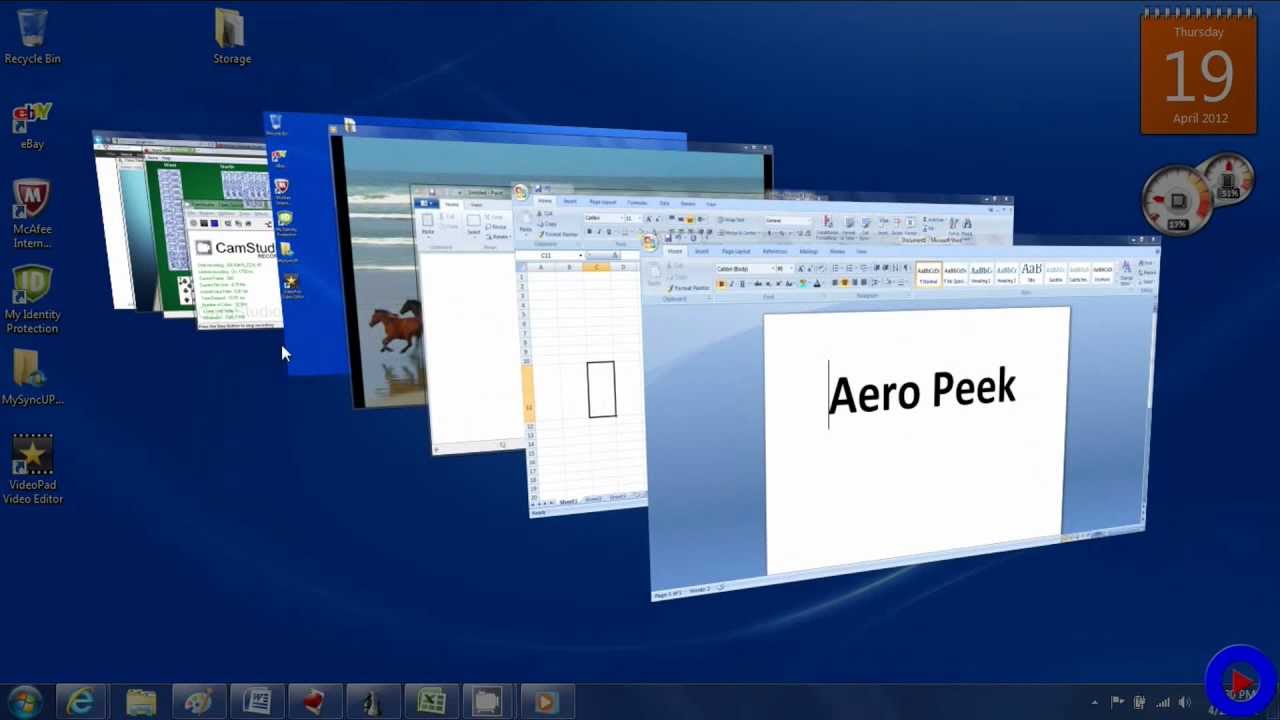
Keyboard shortcuts !! Aero Peek !!

Aero Shortcuts 


[Windows] + [Spacebar] (Aero Peek) 
Make all open windows transparent to view gadgets and icons on desktop. cool keyboard tricks 
[Windows] + [D] (Aero Peek) 
Show or hide the desktop. 
 [Windows] + [Home] (Aero Shake) 
Minimize all but selected window. Reverse by clicking the key combination again. 
 [Windows] + left arrow OR [Windows] + right arrow (Aero Snap) 
Dock selected window to the left or right half of your screen. 
 [Windows] + up arrow OR [Windows] + down arrow (Aero Snap) 
Maximized and restores the selected window. 
 [Windows] + [SHIFT] + up arrow OR [Windows] + [SHIFT] + down arrow (Aero Snap) 
Maximizes and restores selected window in vertical dimension only. 
 

 [Windows] + [Tab] (Aero Flip) 
Launch 3D representation of open windows and click [Tab] key again to flip through them. 
 [Alt] + [Ctrl] + [Tab] + left/right/up/down arrow 
Flip window. 
 [Alt] + [Tab] 
Cycle through open windows.

Important Short Keys ! ! !


Keyboard Short Keys


If you feel that your mouse is not working properly, than you can use these short keys to operate without mouse. Here are some common short keys. 
 Alt + Space + R
 This short key reduces the size of window 
 Alt + Space + M 
You can move any small size window to any corner of your desktop.Use arrows keys to move left, right, top or bottom and press Enter. 
 Alt + Space + X 
You can maximize any small window by pressing this short key. 
 Alt+space+N 
To minimize any window use this short key. 
 Alt + Tab
Maximize any minimized window. Moreover if you are using two or more than two programs then you can also use this short key to select your required programe.
 Win+U+U 
If you want to shut down your computer without mouse then press window key and then press “U” key 2 times. 
 Win + U + R 
Use these keys to restart your Computer. 
 YOU CAN CHANGE THE NAME OF ANY FOLDER WITHOUT MOUSE. Simply highlight required folder through arrows key and press “F2”. Write the name of folder and press Enter.

Thursday, February 28, 2019

Turning your keyboard into a mouse


If your mouse is not working and you don't wish to wait till you get a new one, you would definitely like to know how you can use your keyboard to control the mouse pointer. It is easy to use your mouse to input text using the On Screen Keyboard utility, but it is also possible to do the reverse. This article explains how.
1) Open Ease of Access Center by clicking the Start button , going to Control Panel, clicking Ease of Access, and then clicking Ease of Access Center.
2) Click Make the mouse easier to use.
3) Under Control the mouse with the keyboard, tick the Turn on Mouse Keys check box.