Showing posts with label style sheet language. Show all posts

Monday, March 18, 2019

The Difference Between Block And In-line Element !!


The Difference Between Block And In-line Element !!

We have many markup to use like <br> add line (break line) or <p> separator a piece of text for other but there is difference between them not in the using  but in the function to use :
  so you might have noticed that we have two different ways in HTML of breaking our text into multiple lines
we have < br > empty element and <p> element which is an not empty element

so <p> create a little invisible box around the text .this box called a block and block are heavily involved in how the browser lays out text on the screen
the block has height and width and it also have margin above and below and that's what provide the space around the paragraph this <p> element we called a block and <br> we called in-line element like <em> <mark> <a>(the hypertext element )
it can seem bit abstract trying to imagine these invisible box that the browser constructs around the element.

How To Write HTML Code !!


What is the HTML !!!


It’s the language that provide the structure and the text of web pages, actually HTML based on the Hypertext Markup Language and the text that the user will actually read in their browser.
Hyper text is the text that can have link of references and the references to include other document and files like images video.
Markup code tell the browser how the text should look like ,how it managed.


How To Write HTML Code !!


  - Markup 
Markup is a symbol or tag  that you insert at certain place in a text file. This represents how the file should look when it is printed in your browser.
like  < br >    < em >
when we went to insert images we use  < img  src = " " >
or when add break line we can use  < br > the empty element or < p > the element by the way even <img src="">is empty element 

 Difference between empty element and element!!


the empty element don't need closing tag like <p>  </p> or  <div> </div>
 because it doesn't have any continent
so we have many empty element and element in HTML Language.

So What Is The Web !!


 So What Is The Web !!

1- web


The web :is collection of HTML document and another resources that refer each other links the web is hypertext syntax what this means is that document ,web pages ,sites,web App, can contain references to other documents and the users can follow those references to find related information we call these references hyper link, all the web technology is built around this idea.

2- web pages


Can include resources such images ,video the web pages are usually stored same server or another server in fact to load a web pages your browser send a request for that page to a server.


3- web browser


It is App like Firefox edge, Chrome, Opera, Safari and many others that is designed for displaying web pages, in fact web browser and server interacting in specific way so when you go to any web browser your browser give a request to the server asking for particular  documents by name (index.html) the server send him the document or a message error when  he don't find the documents.
all these operation call protocol means how the browser can speak with the server and tell the web server to use particular set of rules this call (HTTPHTTPS :hypertexte transfer  protocol)

Thursday, January 3, 2019

What is CSS ?

CSS (Cascading Style Sheets)

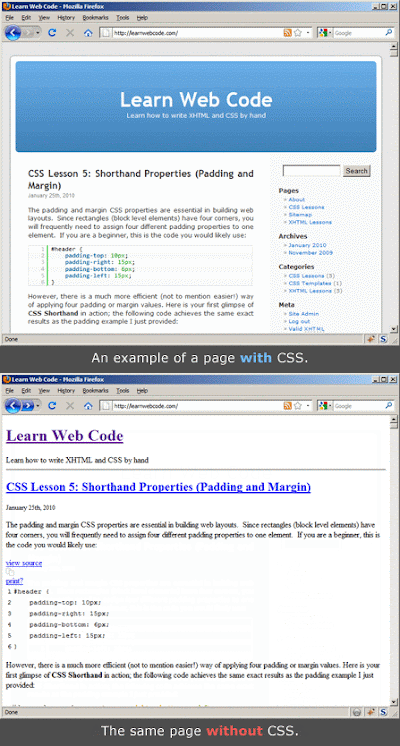
Cascading Style Sheets (CSS) is a style sheet language used for describing the presentation of a document written in a markup language like HTML. CSS is a cornerstone technology of the World Wide Web, alongside HTML and JavaScript.
CSS is designed to enable the separation of presentation and content, including layout, colors, and fonts. This separation can improve content accessibility, provide more flexibility and control in the specification of presentation characteristics, enable multiple web pages to share formatting by specifying the relevant CSS in a separate .css file, and reduce complexity and repetition in the structural content.
Separation of formatting and content also makes it feasible to present the same markup page in different styles for different rendering methods, such as on-screen, in print, by voice (via speech-based browser or screen reader), and on Braille-based tactile devices. CSS also has rules for alternate formatting if the content is accessed on a mobile device.
The name cascading comes from the specified priority scheme to determine which style rule applies if more than one rule matches a particular element. This cascading priority scheme is predictable.
source:Wikipedia